
DailyDroid
We tested whether adding screenshots helps Android agents complete everyday tasks, then examined the failures that a success rate alone would hide.
What DailyDroid tests
We selected five apps in each of five categories and wrote a simple, medium and hard task for each app. The resulting 75 tasks cover everyday interactions with forms, search, media controls and system settings.
| Category | Example apps |
|---|---|
| Productivity & tools | Calendar, Email, Notes |
| Utilities & system tasks | Clock, Settings, Calculator |
| Information access | Wikipedia, Chrome, Maps |
| Media & entertainment | Spotify, YouTube, Books |
| Communication | Facebook, Reddit, Messages |
Two views of the same screen
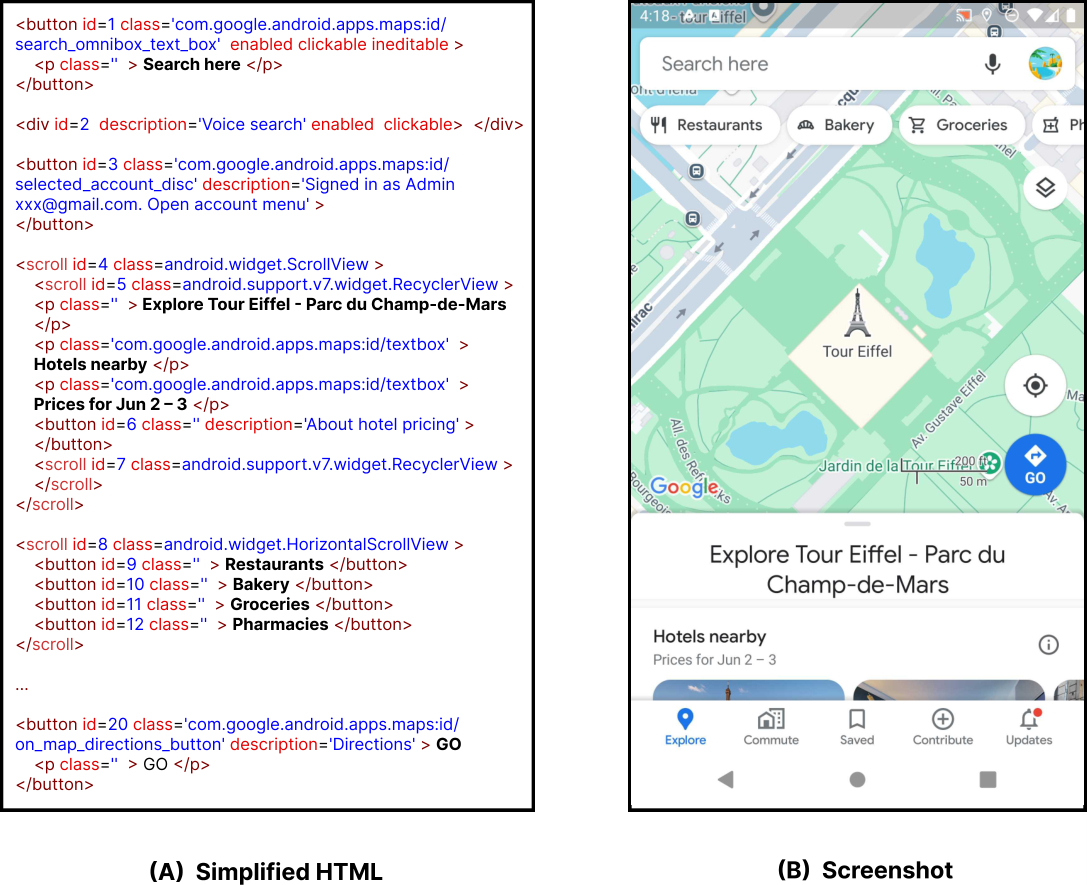
We extended AutoTask to capture a screenshot at each step. The text-only setting used the Android UI tree converted to simplified HTML. The multimodal setting added a screenshot from the same step. Both models ran all 75 tasks in both settings, with the same emulator configuration and a ten-step cap. We reviewed the logs to verify each outcome.
What screenshots changed
| Model and input | Completed | Mean time | Mean cost (USD) |
|---|---|---|---|
| GPT-4o Screen text | 20/75 26.7% | 141.92 s | $0.0947 |
| GPT-4o Text + screenshot | 24/75 32.0% | 144.86 s | $2.4593 |
| o4-mini Screen text | 22/75 29.3% | 204.97 s | $0.0077 |
| o4-mini Text + screenshot | 25/75 33.3% | 220.39 s | $0.1906 |
Adding screenshots yielded four more completions for GPT-4o and three for o4-mini. In this setup, the average model cost per successful task was about 25–26 times higher with screenshots. See the full results table
Where the runs broke down
The Failure Handbook distinguishes system-level blockers from errors the agent makes while it can still act. Failure to retrieve the UI was the most frequent system-level issue, affecting 23–25 of the 75 trials in each condition.
| Failure | What happens |
|---|---|
| UI retrieval | The system fails to fetch the app’s interface. |
| UI parsing | The interface is retrieved, but the system cannot identify the controls needed to continue. |
| Execution | The intended action is identified but cannot be performed. |
| Model prediction or reflection | The agent picks the wrong action or misjudges whether a step worked. |
| Step limit | The run exhausts its action budget, sometimes after repeating the same attempts. |
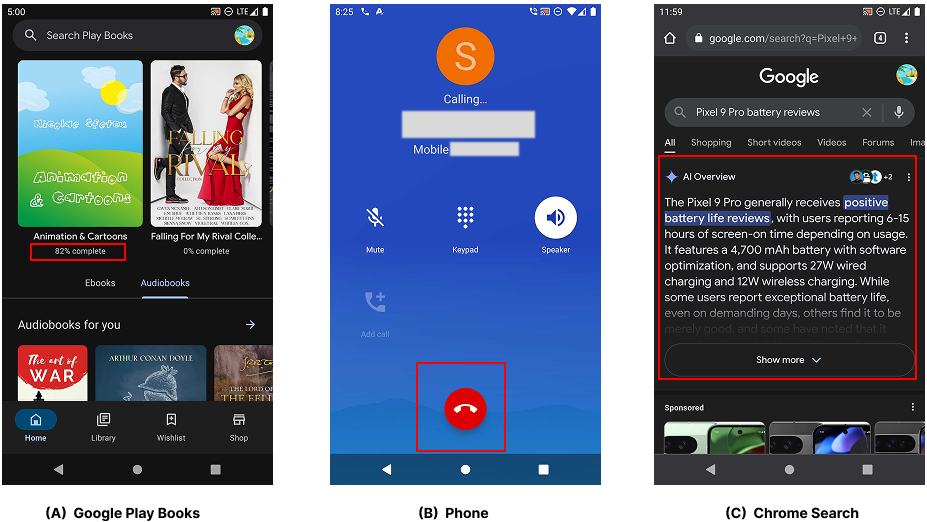
A screenshot can reveal a control such as the red hang-up button. The agent still needs a way to act on it, so an accessibility or execution failure can block the task even when the control is visible. Read the full Failure Handbook
Two recorded runs
The recordings show different tasks and model settings. The tables above compare the four settings on the same tasks.
GPT-4o with screen text · 167 seconds. An Android settings task completed in the text-only setup.
Open in Google Driveo4-mini with screen text and screenshots · 460 seconds. The run ended without completing the lookup.
Open in Google Drive